Azimuth Thruster Labeled
The Azimuth Thruster Labeled is an Azimuth Thruster with a name, a command badge and two readouts — the angle and the thrust — to its left. It is found in the Maritime - OpenBridge section of the Perspective Component Palette as Azimuth Thruster Labeled (Deprecated).
Note: This component is deprecated and will be removed in a later version. Use an Azimuth Thruster together with readouts instead.
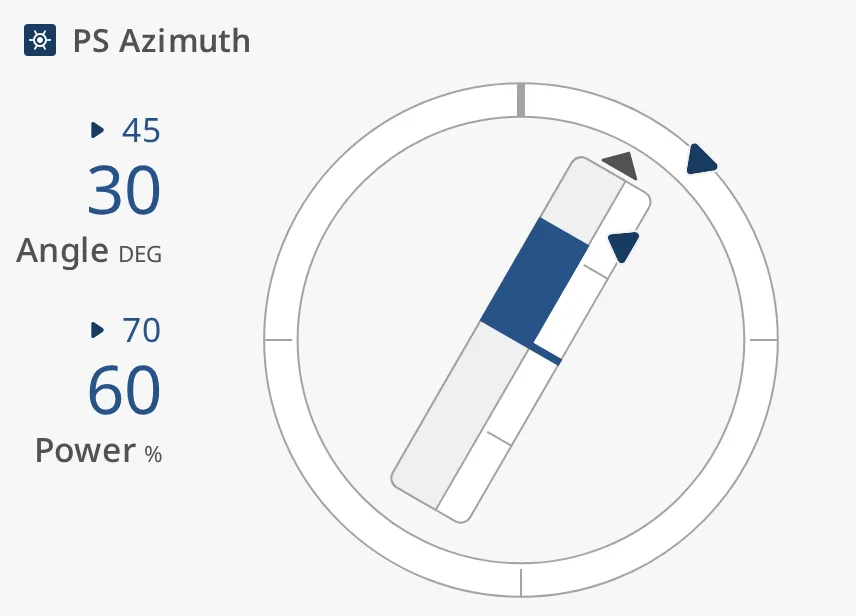
The readouts show angle (Angle, DEG) and thrust (Power, %). The small
number above each readout is its setpoint, or a dash when there is none. The
thruster itself works as on the Azimuth Thruster, with
fewer properties: it has no tickmark intervals, labels, face diameter, state
or priority.
The readouts take a fixed width of about 100 px on the left; the thruster fills the rest of the box. The component needs a box at least about 250 px tall, or the thruster is drawn below it.
commandStatus selects the command badge before the name, and the colours:
in-command(default),partial-command,shared-command— the thruster and the readouts are drawn in the enhanced colours, as in the image above.no-command,command-available,blocked— they are drawn in the regular colours, and the readouts in the medium size whateverreadoutSizeis.
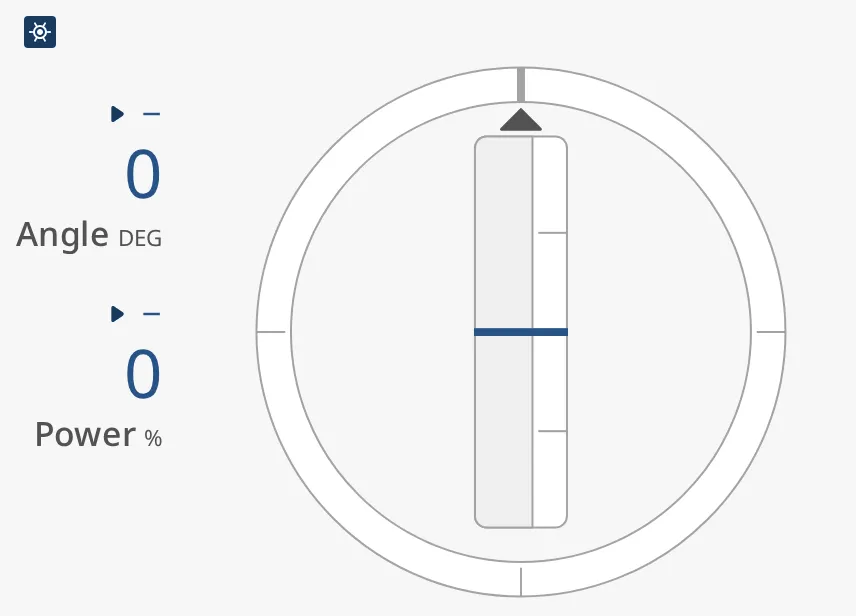
A new Azimuth Thruster Labeled has no name:
Properties
Section titled “Properties”| Name | Description | Property Type |
|---|---|---|
| label | Name shown at the top left. Empty by default. | value |
| commandStatus | Command badge before the name, and the colours; see the list above. Default in-command. |
value |
| size | medium or large. Default medium. |
value |
| readoutSize | small, medium or large: the size of the readouts. Default large. |
value |
| angle | Direction of the thruster in degrees; 0 is ahead. Default 0. |
value |
| thrust | Thrust in percent, -100 to 100. Default 0. |
value |
| hasAngleSetpoint | Show the angle setpoint. Default false. |
value |
| angleSetpoint | Ordered angle in degrees. Only shown when hasAngleSetpoint is true. |
value |
| hasNewAngleSetpoint | Show a second marker for an angle setpoint that is being chosen. Default false. Only shown when hasAngleSetpoint is true. |
value |
| newAngleSetpoint | The angle setpoint being chosen. Only shown when hasNewAngleSetpoint is true. |
value |
| autoAtAngleSetpoint | Let the instrument decide when the angle setpoint is reached. Default true. |
value |
| autoAtAngleSetpointDeadband | Degrees the angle may differ from the setpoint and still count as reached. Default 2. |
value |
| atAngleSetpoint | Whether the angle setpoint is reached, when autoAtAngleSetpoint is false. Default false. |
value |
| angleSetpointAtZeroDeadband | How close to zero the angle setpoint must be to be drawn in its “zero” form. Default 0.5. |
value |
| touching | The operator is operating the thruster lever. Default false. |
value |
| hasThrustSetpoint | Show the thrust setpoint. Default false. |
value |
| thrustSetpoint | Ordered thrust in percent. Only shown when hasThrustSetpoint is true. |
value |
| autoAtThrustSetpoint | Let the instrument decide when the thrust setpoint is reached. Default true. |
value |
| autoAtThrustSetpointDeadband | Percent the thrust may differ from the setpoint and still count as reached. Default 1. |
value |
| atThrustSetpoint | Whether the thrust setpoint is reached, when autoAtThrustSetpoint is false. Default false. |
value |
| thrustSetpointAtZeroDeadband | How close to zero the thrust setpoint must be to be drawn in its “zero” form. Default 0.1. |
value |
| angleAdvices | Advice zones on the ring, with min and max in degrees. Empty by default. |
array |
| thrustAdvices | Advice zones along the bar, with min and max in percent. Empty by default. |
array |
| adviceTrigger | Which reading triggers a zone: both (the value or the setpoint), value or setpoint. Default both. |
value |
| adviceEmphasis | Apply the design’s emphasis rules between go-to and no-go zones. Default false. |
value |
| tickmarkStyle | regular or enhanced. Default regular. |
value |
| singleDirection | Draw only the half of the bar for positive thrust. Default false. |
value |
| topPropeller | none, cap or single. Default none. |
value |
| bottomPropeller | none, cap or single. Default none. |
value |
| style | Standard Perspective style object. | object |
Component Events
Section titled “Component Events”The Azimuth Thruster Labeled has no component events of its own.
Found an error or something unclear?
Tell us what is wrong, confusing or missing on this page.
Built on the OpenBridge Design System