Wind Indicator
The Wind Indicator is a small symbol that shows where the wind comes from and how strong it is, with a wind barb on a round frame. It is found in the Maritime - OpenBridge section of the Perspective Component Palette as Wind Indicator.
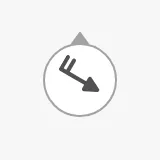
It is the indicator form of the Wind instrument: it has no dial, histogram or vessel, and is meant for places where the wind is one of many things shown. See Instruments and Indicators.
A Wind Indicator dropped from the palette shows calm, a circle:
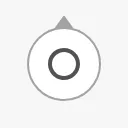
Wind Direction
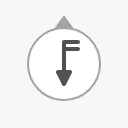
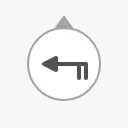
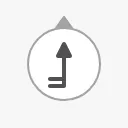
Section titled “Wind Direction”The barb sits on the side the wind comes from and points with the wind. The small triangle at the top of the frame marks north.
0 |
90 |
180 |
270 |
|---|---|---|---|
 |
 |
 |
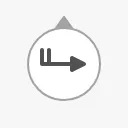 |
The direction the wind comes from, in degrees (0 is north), is given by
currentWindFromDirection, for example bound to
[default]Weather/TrueWindDirection. windFromAngle and angle are older
names of the same property. Views that use them keep working: when one is not
0, it replaces currentWindFromDirection. Use currentWindFromDirection in
new views.
Properties
Section titled “Properties”| Name | Description | Property Type |
|---|---|---|
| currentWindFromDirection | Direction the wind comes from, in degrees; 0 is north. Default 0. |
value |
| windFromAngle | Deprecated name of currentWindFromDirection. When not 0, replaces it. Default 0. |
value |
| angle | Deprecated name of currentWindFromDirection. When not 0, replaces it. Default 0. |
value |
Wind Speed
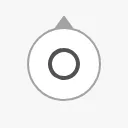
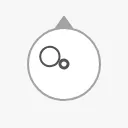
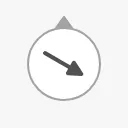
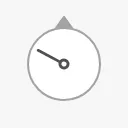
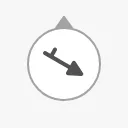
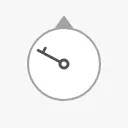
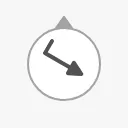
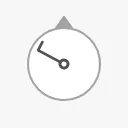
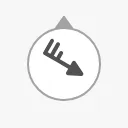
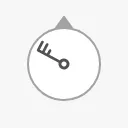
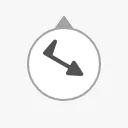
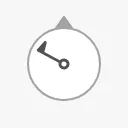
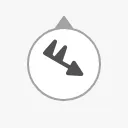
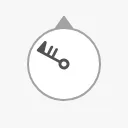
Section titled “Wind Speed”currentWindSpeedKnots is the wind speed in knots. It is shown with the barbs
of a weather chart: a short barb is 5 knots, a long barb 10 knots and a flag
50 knots. The speed is rounded to the nearest symbol: calm (0), a bare arrow
(1), then steps of 5 knots (arrow and labeled have fewer steps above
35 knots). Anything above the strongest symbol, 100 knots, shows that symbol.
| Knots | arrow |
shaft |
|---|---|---|
0 |
 |
 |
1 |
 |
 |
5 |
 |
 |
10 |
 |
 |
25 |
 |
 |
50 |
 |
 |
100 |
 |
 |
Properties
Section titled “Properties”| Name | Description | Property Type |
|---|---|---|
| currentWindSpeedKnots | Wind speed in knots. Default 0 (calm). |
value |
Type and Direction
Section titled “Type and Direction”type selects the symbol, and direction whether it is drawn north up or
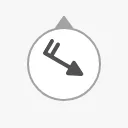
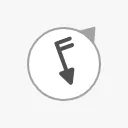
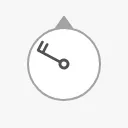
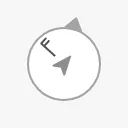
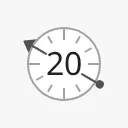
turned with the vessel. The images show 20 knots from 300°, with
rotationAngle 40:
| type | direction = true (default) |
direction = relative |
|---|---|---|
arrow |
 |
 |
shaft |
 |
 |
labeled |
 |
|
arrow(default) — a wind barb with an arrow head.shaft— a thinner barb on a shaft from the centre, with finer speed steps.labeled— the speed as a number in the centre of a dial with tickmarks, and a pointer to the direction the wind comes from.directionandrotationAnglehave no effect on it.
With direction set to relative, the north marker and the wind are turned
clockwise by rotationAngle, in degrees. With true the symbol is always
north up and rotationAngle is not used.
Note: The upstream description of
rotationAnglesays it “could be the heading or the course of the vessel”. As measured, a positive value turns the picture clockwise, so the north marker ends up atrotationAngledegrees. For a picture with the bow up, bindrotationAngleto the heading with its sign reversed, for example the expression-{[default]Navigation/Heading}. This has not been checked against the OpenBridge design.
Properties
Section titled “Properties”| Name | Description | Property Type |
|---|---|---|
| type | arrow, shaft or labeled. Default arrow. |
value |
| direction | true (north up) or relative (turned by rotationAngle). Default true. |
value |
| rotationAngle | Turn of the picture in degrees, with relative. Default 0. |
value |
Priority
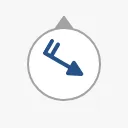
Section titled “Priority”enhanced draws the barb in the enhanced colour. See
Priority.
regular (default) |
enhanced |
|---|---|
|
 |
Properties
Section titled “Properties”| Name | Description | Property Type |
|---|---|---|
| priority | regular or enhanced. Default regular. |
value |
The Wind Indicator has a fixed size of 48 × 48 px, drawn at the top left of the component’s box. A larger box does not make it larger. The blue frame is the component’s box:
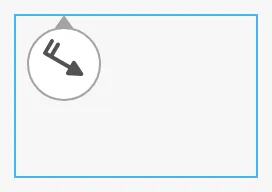
Make the component 48 × 48 px so its box and the symbol match; a new component is 48 × 53 px.
Properties
Section titled “Properties”Properties not covered in the sections above:
| Name | Description | Property Type |
|---|---|---|
| style | Standard Perspective style object. | object |
Component Events
Section titled “Component Events”The Wind Indicator has no component events of its own.
Examples
Section titled “Examples”Example 1 — Wind in the Top Bar
Section titled “Example 1 — Wind in the Top Bar”- Drop a Wind Indicator into the view and make it 48 × 48 px.
- Bind
currentWindFromDirectionto[default]Weather/TrueWindDirection. - Bind
currentWindSpeedKnotsto[default]Weather/TrueWindSpeed. - To show the speed as a number, set
typetolabeled.
Found an error or something unclear?
Tell us what is wrong, confusing or missing on this page.
Built on the OpenBridge Design System