Pitch Roll Heave
The Pitch Roll Heave shows the pitch, the roll and the heave of the vessel in one instrument: the pitch on an arc to the right, the roll on an arc at the bottom, and the heave on a column to the left. It is found in the Maritime - OpenBridge section of the Perspective Component Palette as Pitch Roll Heave (Experimental).
Note: This component is experimental: its properties may change in a later version.
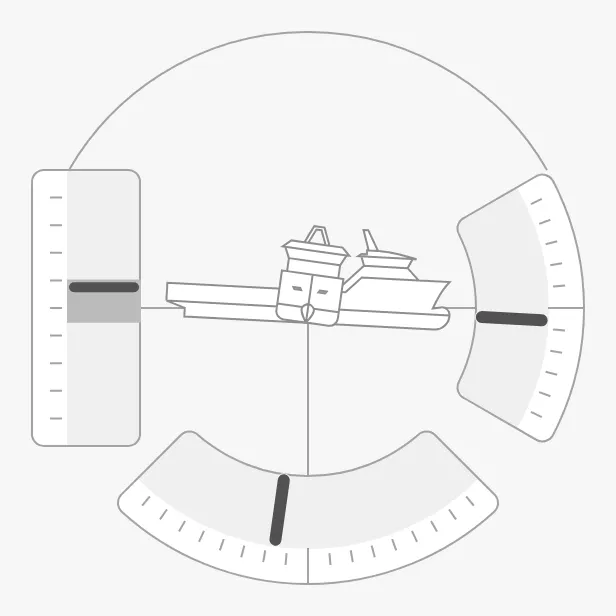
The parts of the instrument:
- Pitch arc — on the right, as on the Pitch.
- Roll arc — at the bottom, as on the Roll.
- Heave column — on the left, as on the Heave. See Heave.
- Vessels — seen from the side and from the fore, or readouts in their place. See Centre.
The average bands, the advice, the arcs, the vessel images and the readouts work as described on the Pitch page, with the name of the axis in the property names.
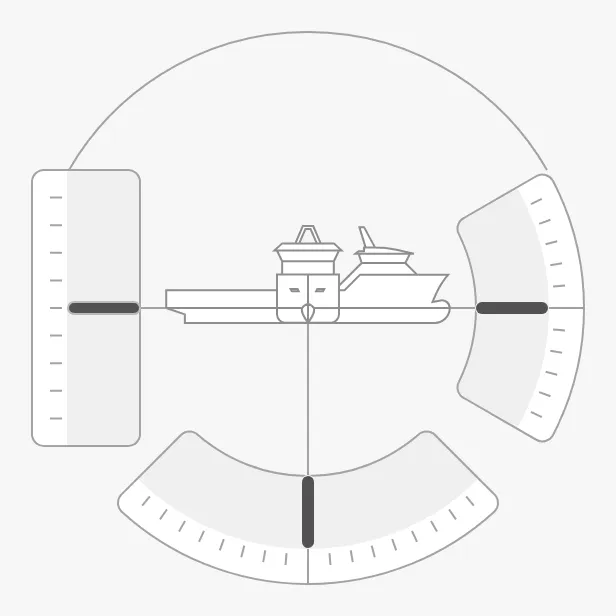
A Pitch Roll Heave dropped from the palette shows all three values at 0 (shown here at 300 × 300 px):
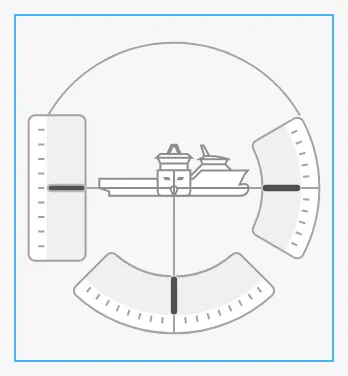
A new Pitch Roll Heave is only 158 × 172 px, the blue frame below. Make it larger:
Layout
Section titled “Layout”type selects the layout:
single-scale (default) |
dual-scale |
|---|---|
|
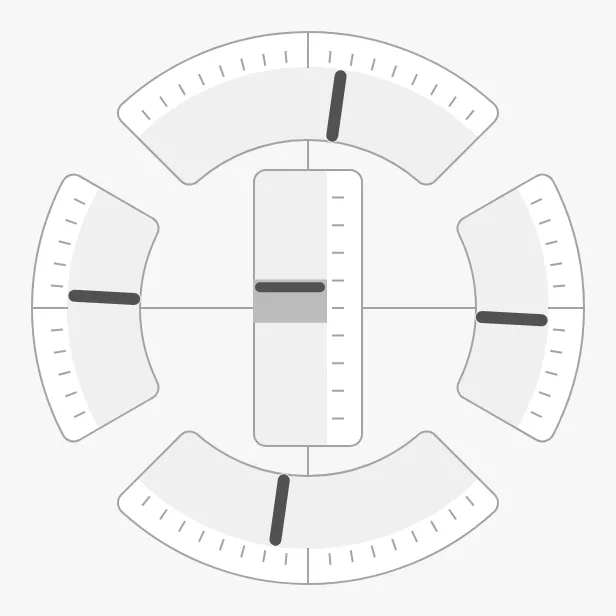 |
single-scale— pitch on the right, roll at the bottom, heave on the left, and the vessels in the centre.dual-scale— the pitch and roll arcs mirrored to the opposite sides, and the heave column in the centre. There are no vessels or readouts.
Properties
Section titled “Properties”| Name | Description | Property Type |
|---|---|---|
| type | single-scale or dual-scale. Default single-scale. |
value |
Pitch and Roll
Section titled “Pitch and Roll”Bind pitch and roll to the pitch and roll of the vessel in degrees; positive
values turn the needles clockwise. minAvgPitch, maxAvgPitch, minAvgRoll
and maxAvgRoll draw the average bands, and the
advice properties draw caution zones as described in
Pitch Advice.
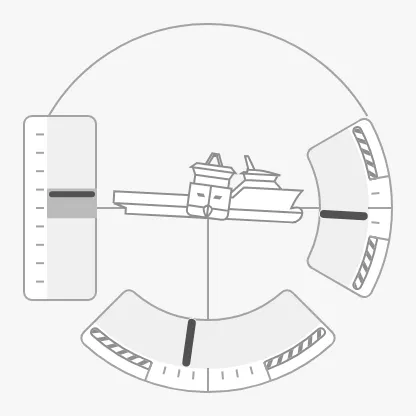
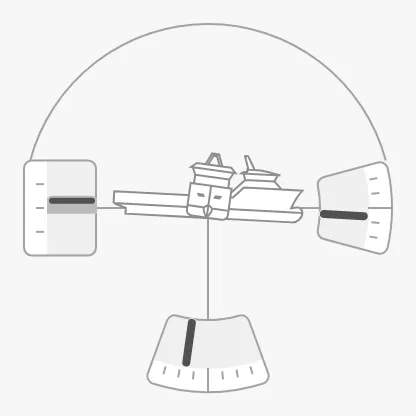
pitchArcAngle and rollArcAngle are how far each arc reaches to each side:
by default ±30° for the pitch and ±45° for the roll. The heave column is as
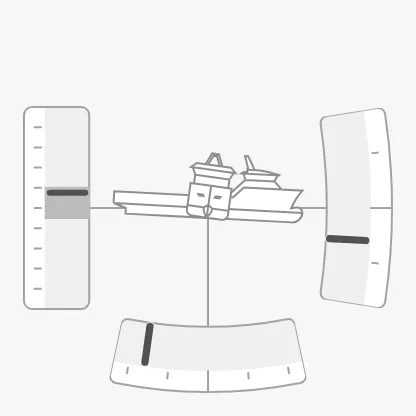
tall as the pitch arc. zoomToFitArc enlarges short arcs to fill the box, as
described in Arc and Zoom.
| Advice on pitch (10°) and roll (20°) | Arcs of ±15° and ±20° | The same, zoomToFitArc = true |
|---|---|---|
 |
 |
 |
Properties
Section titled “Properties”| Name | Description | Property Type |
|---|---|---|
| pitch | Pitch in degrees. Default 0. |
value |
| roll | Roll in degrees. Default 0. |
value |
| minAvgPitch | Lower end of the pitch average band. Default 0. |
value |
| maxAvgPitch | Upper end of the pitch average band. Default 0. |
value |
| minAvgRoll | Lower end of the roll average band. Default 0. |
value |
| maxAvgRoll | Upper end of the roll average band. Default 0. |
value |
| pitchArcAngle | Reach of the pitch arc to each side, in degrees. Default 30. |
value |
| rollArcAngle | Reach of the roll arc to each side, in degrees. Default 45. |
value |
| zoomToFitArc | Enlarge the arcs to fill the box. Default false. |
value |
| hasMaxPitchAdvice | Show the pitch caution zones. Default false. |
value |
| maxPitchAdvice | Largest recommended pitch. Only shown when hasMaxPitchAdvice is true. |
value |
| triggerPitchAdvice | Draw the pitch zones in the caution colour. Only shown when hasMaxPitchAdvice is true. |
value |
| hasMaxRollAdvice | Show the roll caution zones. Default false. |
value |
| maxRollAdvice | Largest recommended roll. Only shown when hasMaxRollAdvice is true. |
value |
| triggerRollAdvice | Draw the roll zones in the caution colour. Only shown when hasMaxRollAdvice is true. |
value |
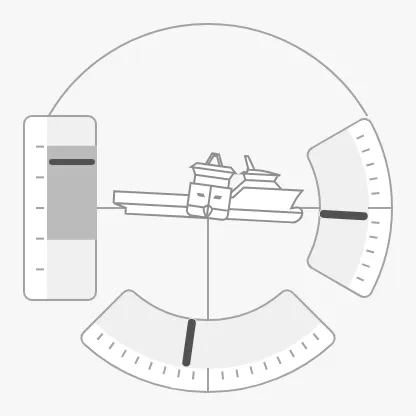
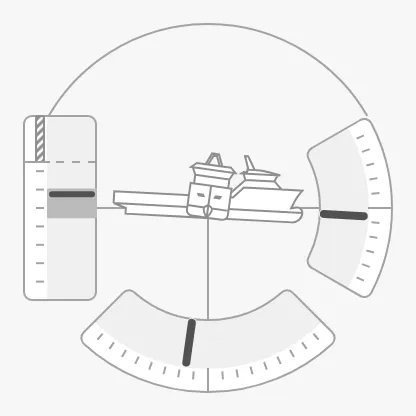
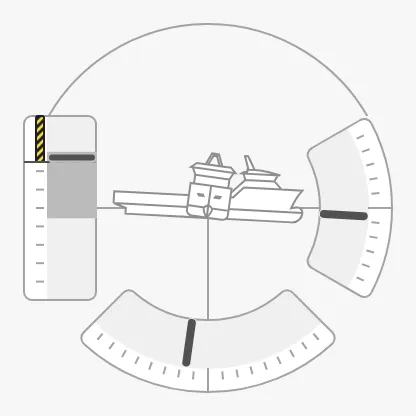
Bind heave to the heave of the vessel in metres; positive is up. The column
spans -heaveRange to heaveRange (default ±10 m). minTrendHeave and
maxTrendHeave draw a darker band: the range the heave has moved within
lately, like the average band of the pitch.
heaveAdvice is a list of zones on the column, each an object with category
(such as optimal or caution), min and max in metres, and optionally
state, as described in Advice Zones. The older
field names type and hinted still work. Unlike the pitch and roll advice, a
heave zone is triggered by itself, when the trend band reaches into it. The
Pitch Roll Heave has no adviceTrigger or adviceEmphasis:
heaveRange = 3 |
Caution zone from 5 m to 10 m | Trend band reaching the zone |
|---|---|---|
 |
 |
 |
Properties
Section titled “Properties”| Name | Description | Property Type |
|---|---|---|
| heave | Heave in metres; positive is up. Default 0. |
value |
| heaveRange | Reach of the column to each side of zero, in metres. Default 10. |
value |
| minTrendHeave | Lower end of the trend band, in metres. Default 0. |
value |
| maxTrendHeave | Upper end of the trend band, in metres. Default 0. |
value |
| heaveAdvice | Advice zones on the column, each with category, min and max (or value) and optionally state. Empty by default. |
array |
Centre
Section titled “Centre”With type single-scale, the centre shows the vessel from the side and from
the fore, chosen with vesselImageSide and vesselImageFore as on the
Pitch Roll. scaleForeImage enlarges the fore view.
The vessel properties, their …Src variants, scaleForeImage and
hasReadout are shown in the Property Editor only while type is
single-scale.
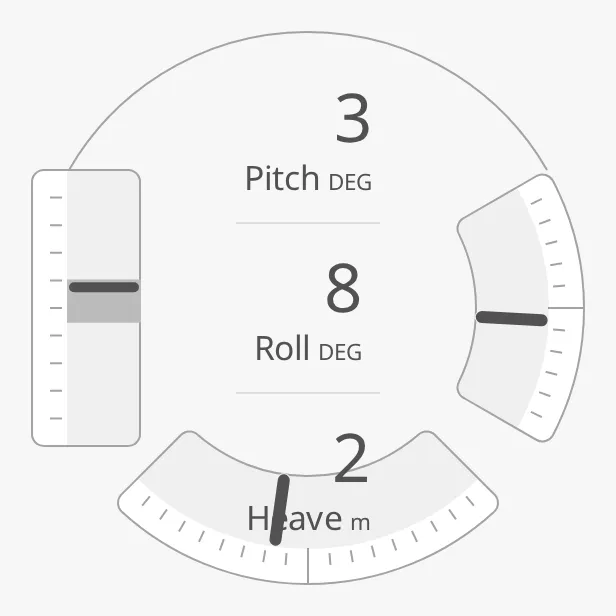
Set hasReadout to true to show the pitch, roll and heave as numbers
instead. A new Pitch Roll Heave has pitchLabel Pitch, rollLabel Roll,
heaveLabel Heave, unit DEG (pitch and roll) and heaveUnit m; clear
them to show the numbers only. The readouts are not shown with type
dual-scale.
hasReadout = true |
Labels and units cleared |
|---|---|
 |
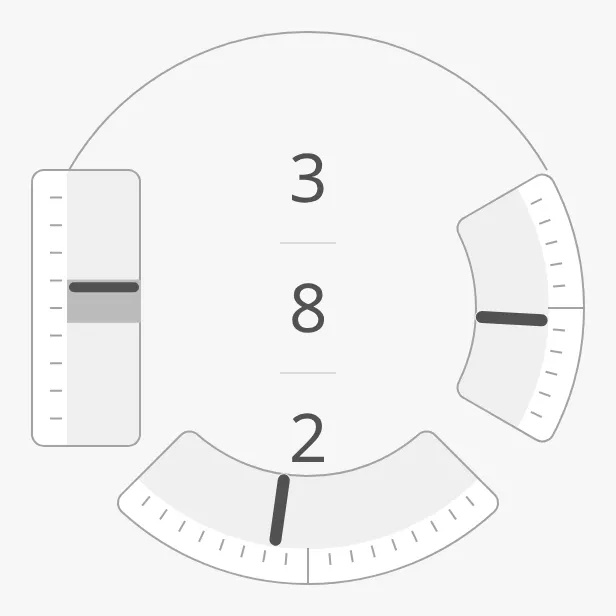 |
Note: The three readouts need more room than the centre has: at 300 px the heave readout touches the roll arc, and with labels it overlaps it, as in the left image. Make the instrument large, or clear the labels.
Note:
hasReadout,vesselImageFore,vesselImageSideandscaleForeImageare meant to be shown only whentypeissingle-scale, but their condition names a value (singleScale) thattypenever has. If the Property Editor does not list them, add them topropsby hand.
Properties
Section titled “Properties”| Name | Description | Property Type |
|---|---|---|
| vesselImageSide | Vessel seen from the side. Default psv-side. |
value |
| vesselImageSideSrc | Your own side view instead of vesselImageSide. See Custom Vessel Image. |
object |
| vesselImageFore | Vessel seen from the fore. Default psv-fore. |
value |
| vesselImageForeSrc | Your own fore view instead of vesselImageFore. See Custom Vessel Image. |
object |
| scaleForeImage | Size factor for the fore view. Default 1. |
value |
| hasReadout | Show the values as numbers instead of the vessels. Default false. |
value |
| pitchLabel | Label of the pitch readout. Default Pitch. |
value |
| rollLabel | Label of the roll readout. Default Roll. |
value |
| heaveLabel | Label of the heave readout. Default Heave. |
value |
| unit | Unit of the pitch and roll readouts. Default DEG. |
value |
| heaveUnit | Unit of the heave readout. Default m. |
value |
| fractionDigits | Number of decimals in the readouts. Default 0. |
value |
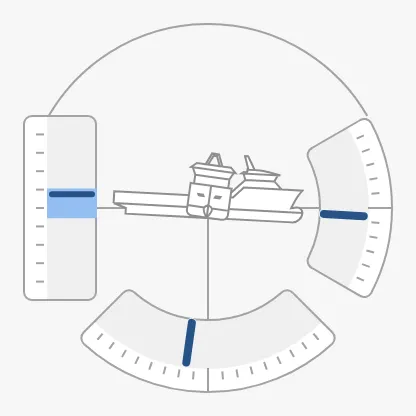
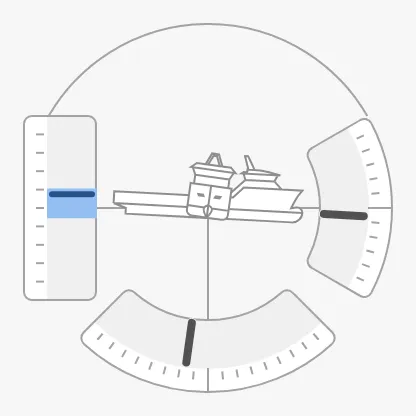
Priority
Section titled “Priority”priority works as described in Priority. With
enhanced, only the axes listed in priorityElements (pitch, roll,
heave) are drawn in the enhanced colour; with an empty list, none is. A new
Pitch Roll Heave lists all three, so enhanced colours them all, as in the left
image:
priority = enhanced |
priorityElements = ["heave"] |
|---|---|
 |
 |
Properties
Section titled “Properties”| Name | Description | Property Type |
|---|---|---|
| priorityElements | Axes drawn in the enhanced colour: pitch, roll, heave. Default ["pitch", "roll", "heave"]. |
array |
Common Properties
Section titled “Common Properties”These work in the same way on every maritime instrument, and are described in Maritime Instruments — Common Features:
- Priority —
priority. - Size — the Pitch Roll Heave fills the smaller side of
its box as a circle; it has no
faceDiameter. - Style and Events —
style.
Component Events
Section titled “Component Events”The Pitch Roll Heave has no component events of its own.
Examples
Section titled “Examples”Example 1 — Motion Reference Unit
Section titled “Example 1 — Motion Reference Unit”-
Drop a Pitch Roll Heave (Experimental) into the view and make it about 300 × 300 px.
-
Bind
pitch,rollandheaveto[default]MRU/Pitch,[default]MRU/Rolland[default]MRU/Heave. -
Set
heaveRangeto3, and bindminTrendHeaveandmaxTrendHeaveto the lowest and highest heave of the last minute. -
To mark heave beyond 2 m, set
heaveAdviceto:[{"category": "caution", "min": 2, "max": 3},{"category": "caution", "min": -3, "max": -2}]
Found an error or something unclear?
Tell us what is wrong, confusing or missing on this page.
Built on the OpenBridge Design System