Compass Indicator
The Compass Indicator is a small symbol, 48 px across, that shows one direction: the heading, the course or north. It is meant to sit next to a readout or in a dense overview, where a full Compass does not fit. It is found in the Maritime - OpenBridge section of the Perspective Component Palette as Compass Indicator.
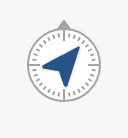
It is one of the indicators of the maritime instruments: it has no scale, state or priority. See Instruments and Indicators.
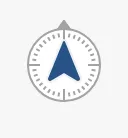
A Compass Indicator dropped from the palette shows a heading of 0°:
Direction and Type
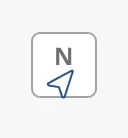
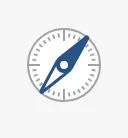
Section titled “Direction and Type”Bind angle to the direction in degrees. direction selects what the symbol
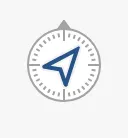
stands for, and type how it is drawn. The images show an angle of 40°:
| direction | regular (default) |
labeled |
|---|---|---|
heading (default) |
|
 |
course |
 |
 |
north |
 |
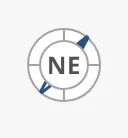 |
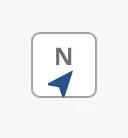
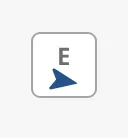
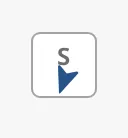
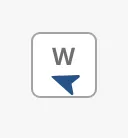
heading— a filled arrow, like the heading arrow of the Compass.course— an outlined arrow, like the course-over-ground arrow.north— a compass needle.regular— the arrow or needle on a small compass face.labeled— forheadingandcourse, the arrow in a frame under the nearest of the letters N, E, S and W; fornorth, the needle around the nearest of the eight compass points (N, NE, E, …).
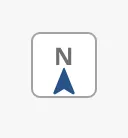
The letter of the labeled type follows the angle:
0 |
100 |
200 |
290 |
|---|---|---|---|
 |
 |
 |
 |
Properties
Section titled “Properties”| Name | Description | Property Type |
|---|---|---|
| angle | Direction in degrees. Default 0. |
value |
| direction | heading, course or north. Default heading. |
value |
| type | regular or labeled. Default regular. |
value |
North Up or Heading Up
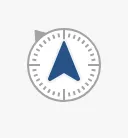
Section titled “North Up or Heading Up”With northUp true (the default) the compass face stays with north up and
the arrow turns to angle. With northUp false the arrow stays pointing up
and the face turns instead — the heading-up presentation. The small grey
triangle on the face marks north.
| direction | northUp = true |
northUp = false |
|---|---|---|
heading |
|
 |
course |
|
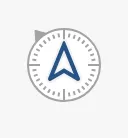 |
northUp only changes the regular type with direction heading or
course. The north needle and the labeled type look the same either way.
Properties
Section titled “Properties”| Name | Description | Property Type |
|---|---|---|
| northUp | Keep the face north up and turn the arrow; false turns the face. Default true. |
value |
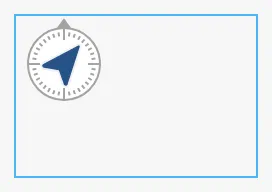
The symbol is always 48 × 48 px and sits at the top left of the component’s box; it does not grow with the box. A new component is 48 × 53. The blue frame is the component’s box:
Properties
Section titled “Properties”Properties not covered in the sections above:
| Name | Description | Property Type |
|---|---|---|
| style | Standard Perspective style object. | object |
Component Events
Section titled “Component Events”The Compass Indicator has no component events of its own.
Examples
Section titled “Examples”Example 1 — Heading Next to a Readout
Section titled “Example 1 — Heading Next to a Readout”- Drop a Compass Indicator to the left of a readout of the heading.
- Bind
angleto[default]Nav/Heading. - Set
typetolabeled, so the indicator also shows the nearest cardinal direction.
Found an error or something unclear?
Tell us what is wrong, confusing or missing on this page.
Built on the OpenBridge Design System