Instrument Field
The Instrument Field shows one navigation value — speed, heading, depth — with a tag and a unit under it, and optionally a setpoint above it and a source below. It is found in the Maritime - OpenBridge section of the Perspective Component Palette as Instrument Field (Deprecated).
Note: This component is deprecated and will be removed in a later version. Use the Readout instead.
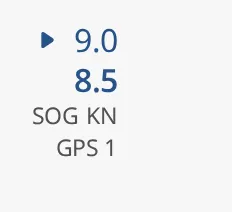
The value and setpoint are drawn in the enhanced colour unless neutralColor is
set. The field keeps its natural size at the top left of the component’s box.
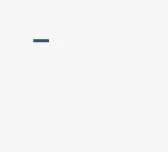
A new Instrument Field has no value and shows a dash:
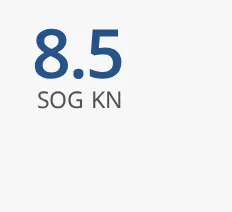
With size set to enhanced the value is larger:
Moving to the Readout
Section titled “Moving to the Readout”The Readout shows the same information in the current OpenBridge design. Its properties for the same things:
| Instrument Field | Readout |
|---|---|
size regular |
size small |
size enhanced |
size large |
tag |
label |
unit, value, setpoint, hasSetpoint |
the same names |
hasSrc and src |
src: a source is shown when it is not empty |
fractionDigits |
numberFormat, for example 0.0 for one decimal |
| default colour | priority enhanced |
neutralColor |
priority regular |
showZeroPadding and maxDigits |
valueOptions.hintedZeros and maxDigits |
horizontal |
direction horizontal |
center |
stacking stacked with alignment center |
labelOnly |
hasValue false |
off |
off, with the text in offText |
autoHideSetpoint |
setpointOptions.interaction pop-up |
autoHideDeadband |
no equivalent: the pop-up setpoint hides only when value and setpoint are equal |
The Readout does not look exactly the same: it is the redrawn OpenBridge 6.1 design of the same information.
Properties
Section titled “Properties”| Name | Description | Property Type |
|---|---|---|
| size | regular or enhanced (larger). Default regular. |
value |
| hasValue | Show value. Without it the field shows a dash. Default false. |
value |
| value | The value. Only shown when hasValue is true. |
value |
| fractionDigits | Number of decimals shown. Default 0. |
value |
| maxDigits | Number of digits before the decimal point, for zero padding. Default 1. |
value |
| showZeroPadding | Meant to fill up to maxDigits with leading zeros; no zeros were drawn when tested. Default false. |
value |
| tag | Short name of the value, such as SOG or HDG. |
value |
| unit | Unit, such as KN or DEG. |
value |
| hasSetpoint | Show the setpoint above the value. Default false. |
value |
| setpoint | The setpoint. Only shown when hasSetpoint is true. |
value |
| autoHideSetpoint | Hide the setpoint while the value is within autoHideDeadband of it. Only shown when hasSetpoint is true. Default false. |
value |
| autoHideDeadband | How close the value must be to hide the setpoint. Only shown when hasSetpoint is true. Default 0. |
value |
| hasSrc | Show the source under the tag. Default false. |
value |
| src | Name of the source, such as GPS 1. Only shown when hasSrc is true. |
value |
| neutralColor | Draw the value in the neutral instead of the enhanced colour. Default false. |
value |
| horizontal | Place the tag and unit beside the value instead of under it. Default false. |
value |
| center | Centre the content. Default false. |
value |
| labelOnly | Show only the tag and unit. Default false. |
value |
| off | Show OFF instead of the value. Default false. |
value |
| style | Standard Perspective style object. | object |
Component Events
Section titled “Component Events”The Instrument Field has no component events of its own.
Found an error or something unclear?
Tell us what is wrong, confusing or missing on this page.
Built on the OpenBridge Design System